MyThumbTester guide
Can you use a different title for each thumbnail in a side-by-side preview?
MyThumbTester uses one shared title in both A/B panels. Compare images with one title, or export separate previews for two image-and-title packages.
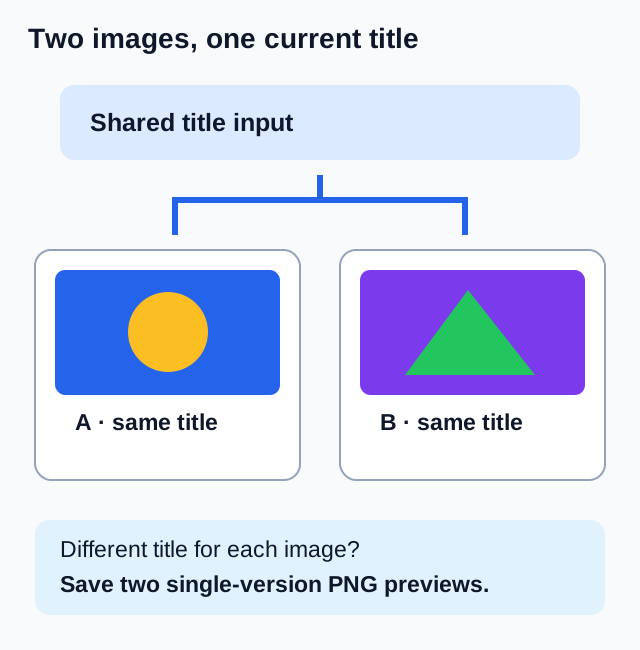
Both panels use the same title; use separate exports for different title packages
MyThumbTester’s side-by-side thumbnail preview uses one shared title for Version A and Version B. Entering a title updates both panels. In the current renderer, drawVersion temporarily changes the image for each panel but leaves the shared title state unchanged. To compare two different image-and-title packages, export each package separately in the same layout and theme. This is a reproducible interface and rendering fact; MyThumbTester does not predict CTR, rankings, distribution, or views.
The A/B labels identify your two local image inputs. The control does not alternate variants to viewers, measure a winning title, or give either panel a separate title field.
Use the shared title for an image-only comparison
Load your primary thumbnail and a second local file as Version B. Enter one exact draft title, choose a layout, and inspect both images beside that same title. Keeping the title fixed lets you describe image differences without also changing the words beside them.
The export contains both panels and the common title. Record whether a visible difference comes from subject size, composition, image text, or the relationship between the image and the unchanged title. That is a visual observation rather than an audience result.
Review two complete packages with separate PNG files
For a package review, switch to one-version mode. Load the first image, enter its intended title, keep the layout and theme fixed, then export a PNG. Replace the primary image with the second package’s file, enter its different title, and export another PNG.
Rename the two downloads clearly, because the tool’s suggested filename identifies the layout rather than a revision or title. Compare the two saved previews with both the image and wording recorded. Avoid treating that comparison as evidence that a particular change caused a performance difference.
Check the title state before saving
When you return to side-by-side mode, the current title still applies to both images. Verify the primary and comparison images and the shared title before exporting. Replacing an image does not create a separate title history for it.
If you need to study viewer response to different titles or thumbnails, use an appropriate eligible platform experiment and its actual results. The local PNG files document what you reviewed, not how an audience responded.